
Auto Clicker
Screenshots
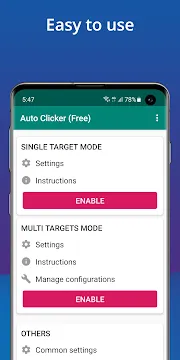
Auto Clicker – Automatic tap App For Android helps you automate repetitive touching tasks on your smartphone screen. Many mobile games and applications require users to tap the same spot hundreds of times to progress. This tool removes the physical strain and boredom associated with these manual actions. You can set up the app to perform clicks at specific intervals without any human intervention. It works perfectly for clicking games, social media interactions, and system testing.
The application functions by creating a virtual overlay on top of your existing software. You can place the target pointer anywhere on your screen to define the exact clicking location. It does not require root access to function on most modern devices, making it accessible to a wide audience. The interface remains clean and focused on utility to ensure a smooth user experience. Whether you want to level up in a game or automate a work task, this software provides the necessary precision.
Efficient Single Target and Multi-Target Modes
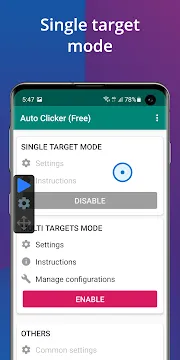
Auto Clicker offers two primary modes to suit different automation needs. The single-target mode focuses on a specific point on your screen for rapid, continuous clicking. This is ideal for simple “clicker” games where speed is the most important factor. You can start or stop the action with a simple floating control panel. It allows you to maintain focus on the game while the app handles the heavy lifting.
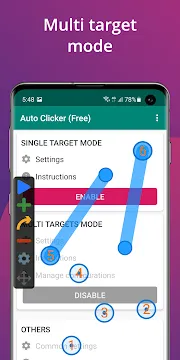
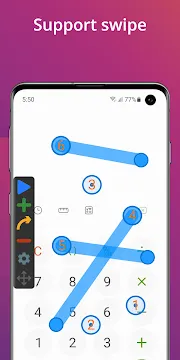
The multi-target mode provides more complex automation for advanced users. You can place multiple click points across the screen and define the order in which they activate. This mode also supports swipe gestures, allowing the app to scroll through pages or move game characters. You can create intricate scripts that simulate real human interaction with your device. Each point can have its own unique delay and duration settings.
Precise Timing and Interval Settings
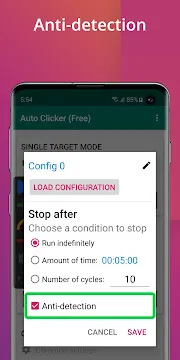
Control over timing is a vital feature for any automation tool. This app allows you to set the delay between clicks down to the millisecond. You can choose to click as fast as your device hardware allows or set a slower, more natural pace. This level of detail helps you avoid detection in games that monitor for robotic behavior. You can adjust these settings on the fly without closing your active application.
- Set intervals in milliseconds, seconds, or minutes.
- Choose between a fixed number of clicks or an infinite loop.
- Define the duration of each individual touch or swipe.
- Schedule a start timer to begin automation at a specific time.
The app also includes a “randomize” feature for your click intervals. This adds a slight variation to the timing to make the automation look less like a script. It helps maintain the stability of your apps by preventing sudden bursts of data. You have total control over how the machine interacts with your mobile interface.
Save and Load Custom Configurations
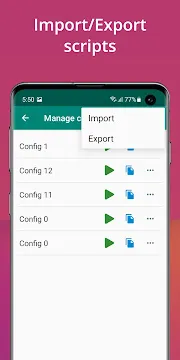
Setting up a complex multi-point script can take time and effort. Auto Clicker allows you to save your configurations so you can use them again later. You can name each script according to the game or task it belongs to. This makes it easy to switch between different automation profiles in seconds. You do not have to recreate your settings every time you open the app.
The loading process is instant and places all pointers exactly where you left them. This is particularly useful for games with fixed UI elements that never change position. You can share your configurations with friends or move them to a new device. It ensures that your hard work in designing a perfect script is never lost. The app keeps your library of automations organized and ready for action.
Floating Control Panel for Easy Access
The floating control panel acts as the main interface while you use other apps. It stays on top of your screen as a small, transparent menu. You can move the panel to any corner to keep it out of the way of your game content. It includes buttons to play, pause, and adjust your settings without leaving your current task. This design keeps the automation process unobtrusive and efficient.
You can also use the panel to add or remove click points instantly. If a game menu changes, you can simply drag the pointers to their new locations. The panel disappears when you close the main app to keep your screen clean. It provides a professional level of control that feels natural on a mobile device. You remain the master of your automation at all times.
Improving Productivity and Gaming Performance
Many people use this tool to boost their productivity during repetitive data entry tasks. It can handle simple form submissions or page refreshes automatically. This frees up your time to focus on more important aspects of your work. In the gaming world, it helps you collect daily rewards and resources while you are away from your phone. You can keep your game running overnight to achieve massive progress.
The app manages system resources carefully to prevent your phone from slowing down. It uses very little battery power even during long automation sessions. This allows you to run the software for hours without worrying about your device overheating. It is a reliable partner for anyone who wants to get the most out of their Android hardware. You can achieve goals that would take days of manual effort in just a few hours.
Simple Setup and Accessibility Options
Getting started with Auto Clicker is a straightforward process for everyone. You only need to grant accessibility permissions for the app to interact with your screen. The software provides a clear tutorial to guide you through these initial steps. It does not collect your private data or monitor your personal messages. The focus remains entirely on simulating screen touches for your convenience.
The settings menu is easy to navigate and uses clear, descriptive labels. You can toggle features like “anti-detection” or “touch vibration” with a single click. The app supports multiple languages to cater to a global community of users. Regular updates ensure that the tool stays compatible with the latest Android versions and security patches. It provides a safe and effective way to automate your mobile life.
Final Thoughts
Auto Clicker – Automatic tap App For Android is a powerful utility for both gamers and professionals. It simplifies the way you interact with repetitive apps by offering precise automation. With its dual modes and detailed timing settings, it provides the flexibility needed for various tasks. The ability to save configurations and use a floating control panel makes it incredibly user-friendly. You can protect your screen and your fingers from the wear and tear of thousands of clicks. This application turns your smartphone into a more efficient tool that works for you. Whether you are chasing a high score or managing a workflow, this app delivers consistent results every time.







